
ONLY 6 SPOTS LEFT!

Hands-on Excel Training From Zero to Expert with an Industrial Engineer: A Comprehensive Guide for Students and Corporate Professionals

Online, one-to-one Excel lessons with Doğukan Özdağ, entirely at your own pace.

RowABCD
1StudentScoreResult
2Elif82Pass
3Mert64Retake
4Zeynep91Pass
5Can70Pass
With IF, scores of 70 and above get “Pass” and lower scores get “Retake”. We solve examples like this together in the lessons.
  • 5 yearsof Excel project and teaching experience
  • 100+students
  • ≈300practice files
  • Every lessonrecorded on video

About me

Hello, I’m Doğukan.

Excel instructor Doğukan Özdağ

I work as an industrial engineer in the automotive industry. I use Excel actively in my professional work, and I build my lessons around the way Excel is really used in business.

For 5 years, I have been developing Excel projects and giving one-to-one private lessons. During this time, I have taught more than 100 students.

My aim in the lessons is not to have you memorize formulas, but to teach you how to think in Excel. Step by step, hands-on and with an engineering mindset, you learn how to get work that takes hours done faster and without errors.

We build the lesson plan together around your goals and learning pace. By the end of the training, you will be able to prepare and edit your own spreadsheets, reports and analyses entirely on your own.

Examples from the lessons

What will you do in the lessons?

From charts and pivot tables to dashboards you can read at a glance. Both examples below were built from the same sales table; the data is for illustration only.

Sales dashboardJanuary–June 2026
Total sales₺4.82M▲ 12.9% vs last year
Orders1,248
Average order₺3,862
Target achieved94.5%
Dashboard: key figures and a monthly sales chart with a target line, all on one screen.
PivotTableTotal sales, ₺ thousand
Total sales by region and quarter, thousand lira
Sum of SalesColumn Labels ▾
Row Labels ▾Q1Q2Grand Total
Marmara8801,0401,920
Central Anatolia5306201,150
Aegean450530980
Mediterranean360410770
Grand Total2,2202,6004,820
PivotTable: sums up thousands of sales rows by region and quarter in seconds; in-cell data bars show the differences.

About the lessons

How do the lessons work?

Unlike a crowded Excel course, the lessons are online and one-to-one. You can join from Istanbul, Ankara, Izmir or any other city in Türkiye.

  1. A personalized plan, suitable for every level

    Before the training begins, we assess your current Excel level and what you want to use this training for. Based on the result, we create a personalized lesson roadmap built entirely around your needs and goals.

    Everyone is welcome, from people who have never used Excel to those who know the basics and want to improve.

  2. Active, hands-on lessons at your own pace

    Our lessons take place online through screen sharing. But they are by no means a passive “I talk, you listen” process. To reinforce every new formula or tool right away, after I explain it, I guide you as you solve the examples yourself during the lesson. This way, you learn by doing, and we sort out anything you get stuck on immediately. We move entirely at your pace and never skip a topic until you have fully understood it and feel confident with it.

  3. Lifetime access to video recordings and Excel files

    One of the biggest advantages of our lessons: every lesson is recorded. So you can watch the recordings again whenever you like to reinforce what you have learned.

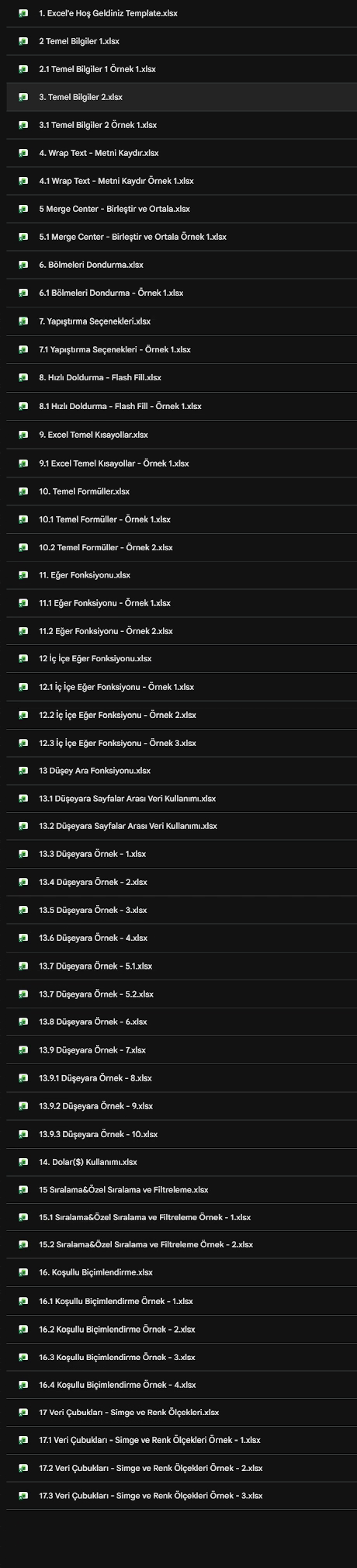
    You also get lifetime access through Google Drive to around 300 Excel files in total: the ones we solve together during the lessons and the ones prepared for you to practice on your own afterwards.

    Excel practice files on Google Drive (file names in Turkish): example files for the basics, IF, VLOOKUP, conditional formatting and data bars
  4. Flexible scheduling, suitable for every level

    All our training takes place remotely (online). We schedule the lesson days and times together so that they fit both of our calendars.

  5. Excel training, level by level

    How long does it take to learn Excel? That depends on the level you want to reach. The training has three levels: beginner, intermediate and advanced. Because each level also covers the topics of the one before it, the training always starts with the basics.

    Across these levels, you learn hands-on how to match data from different tables with VLOOKUP, summarize large datasets in seconds with pivot tables, and build dashboards that can be read at a glance.

    You can find a detailed list of the topics covered at each level in the Lesson levels section.

Training packages

Lesson levels

Each level covers all the topics of the level before it, so the training starts with the basics at every level. You can choose how far to go based on your goals.

Beginner Excel Training

Approx. 10–15 lessons

Who is it for?
For people who have never used Excel before or have just started learning it, and who want to be able to build their own tables and do basic calculations on their own.
What will you learn?
  • Getting to know the Excel interface and entering data
  • Writing formulas with the four basic operations
  • Formatting tables with tools such as Wrap Text, Merge & Center and Freeze Panes
  • Copy and paste options
  • The Flash Fill tool
  • Working faster in Excel with essential shortcuts
  • Basic functions such as SUM, AVERAGE, MIN, MAX and COUNT
  • IF and nested IF functions
  • VLOOKUP and working with data across sheets
  • Locking cell references with the dollar ($) sign
By the end of this level
You will be able to use Excel at a basic level, format simple tables and carry out calculations with formulas.

Recommended package

Intermediate Excel Training

Approx. 20–25 lessons

Who is it for?
For people who want to learn Excel from scratch, use it effectively at work, and analyze their own data to prepare their own reports.
What will you learn?

In addition to everything covered at the beginner level:

  • Text, date and number functions
  • COUNTIF, COUNTIFS, SUMIF and SUMIFS functions
  • IFERROR and XLOOKUP functions
  • Excel tables
  • Filtering and sorting options
  • The Text to Columns tool
  • Conditional formatting
  • Data validation and drop-down lists
  • Pivot tables
  • Charts
  • Print settings
  • Comprehensive Excel shortcuts and advanced tips
By the end of this level
You will be able to use Excel effectively and design your own tables and formulas without outside help. As a result, you will work in Excel faster and without errors.

Advanced Excel Training

Approx. 35–40 lessons

Who is it for?
For people who want to learn Excel from scratch, take it to an advanced level, and become Excel experts by building dashboards, macros and comprehensive projects.
What will you learn?

In addition to everything covered at the beginner and intermediate levels:

  • Mathematical and statistical functions
  • Grouping data with the Outline tools
  • Detailed chart settings
  • Creating and editing dashboards
  • Automating tasks with macro tools
  • Building advanced Excel projects (such as timesheets and inventory tracking systems)
  • Goal Seek and Data Table
  • Using Solver
  • Sheet and workbook protection
By the end of this level
You will master Excel at an advanced level and know its details and shortcuts inside out. You will have the knowledge and skills to build, edit and publish any project or dashboard yourself, and to develop automation projects.

Lesson counts are averages and may vary with your learning pace. Each lesson lasts 60 minutes.

Reviews

What do my students say?

Translated from my students’ original reviews in Turkish.

See my reviews on Superprof (opens in a new tab)
Songul

I’m really very happy with our Excel teacher. He explains very well not only how formulas are written, but also the logic behind them. Thanks to this, I learn by truly understanding instead of memorizing.

Having the lessons recorded is a big advantage; I can rewatch the parts I missed or want to go over again. He also shows short, practical methods, which has helped me use Excel much faster and more efficiently.

He gives plenty of detailed homework. It may seem challenging at first, but it really helps me reinforce the topics. He also follows up on it, which builds discipline.

He’s a great teacher for anyone who really wants to learn, and I recommend him wholeheartedly.

Nesibe

Doğukan is very meticulous and goes through everything step by step. He explains any part I don’t understand in depth and makes it easier for me to understand by having me do it myself. Excel was always a big fear of mine, so finding it this enjoyable to understand has been a wonderful twist.

Derya

Doğukan’s lessons are versatile and well organized. He has good learning materials and doesn’t hesitate to share them. His explanations are fluent and, above all, very clear. He also patiently explains everything again until it is understood. He has very good and broad knowledge of computer science as well. I highly recommend him as a teacher!

Enes

Someone who truly loves teaching; he helps you with the topics you don’t understand until you get them. His friendly manner made our lessons very enjoyable and informative. Thank you once again.

Ahsen

Doğukan helped me a lot with Excel Solver. He answers every question I ask and gets back to me quickly.

Ali

Doğukan is a tutor who loves teaching and helps you with Excel without skipping even the smallest detail. You can start the lessons without any hesitation.

Ali ErenReference

He takes great care over his lessons and always puts the student first. With his deep knowledge of Excel and his work, he gives his students a great experience. He is the person I would recommend for your lesson requests.

EmirReference

He explains things clearly and encouragingly, and he is devoted to his students and their learning. He helped me in many areas until I understood. He won’t leave you on your own at any point during the training. I recommend taking lessons from him.

KeremReference

Doğukan takes his lessons very seriously and wants the person in front of him to leave at a whole new level. With his clear, simple explanations, I don’t think there is any topic you can’t master.

FAQ

Frequently asked questions

If you have any other questions, feel free to message me on WhatsApp.

Is the first lesson really free?

Yes. In the first lesson, we briefly get to know each other, talk about your Excel level and goals, and draw up a lesson plan that suits you. Then we start on the first topic.

How much do the lessons cost?

Just send me a message on WhatsApp for the current price. Since the first lesson is free, you can try a lesson first and decide afterwards.

How long is a lesson?

Each lesson lasts 60 minutes. We schedule the lesson days and times together so that they fit both of our calendars.

Which platform are the lessons held on?

The lessons are held online via Microsoft Teams or Google Meet.

I don’t know Excel at all. Can I still start?

Yes. The training has three levels: beginner, intermediate and advanced. Whichever level you choose, the lessons start with the basics, so not knowing Excel at all is no obstacle.

Can I take the beginner level first and continue later?

Yes. All packages start with the beginner level. Then, depending on your goals and wishes, we continue first with the intermediate level and finally with the advanced level.

Can I rewatch the lessons later?

Yes. Every lesson is recorded, and I share the recording with you. You also get lifetime access through Google Drive to the Excel files we use in the lessons.

Contact

Get in touch to plan your lessons

Bring your goals, and let’s start one-to-one Excel lessons tailored to you.

WhatsApp